Project Snapshot
Key takeaway
This project helped me practice building a polished dashboard experience while also treating the app like a more realistic production build. One of the biggest takeaways was learning how much more stable Playwright tests become when locators are structured clearly and the test setup stays intentional.
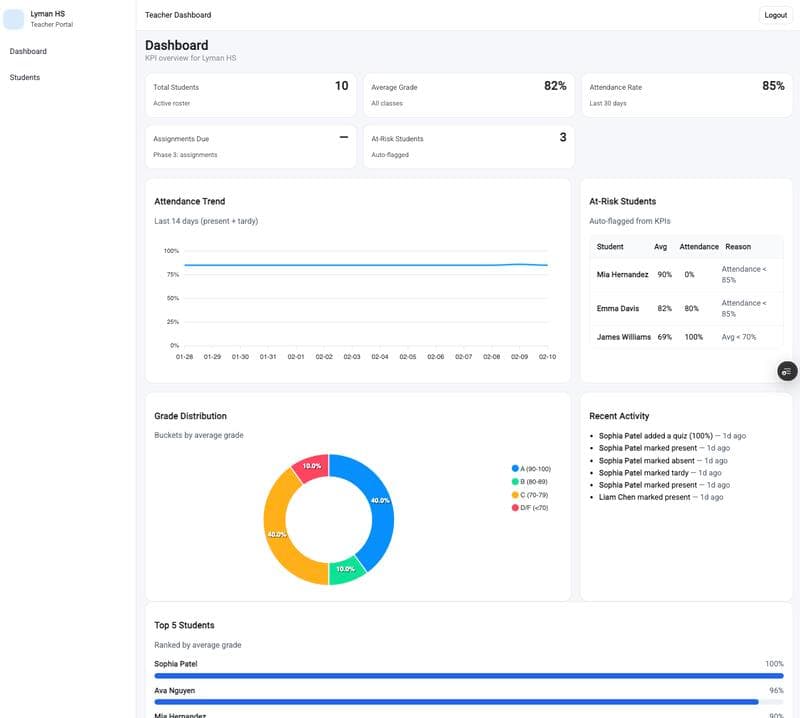
This project focuses primarily on frontend architecture and UI patterns rather than backend complexity.
I had a lot of fun building this project and got to practice some Angular fundamentals. Play with it and let me know what you think!
Key Features
- Interactive KPI dashboard with ApexCharts visualizations
- CRUD student management interface
- Responsive layout optimized for quick classroom insights
- Playwright end-to-end testing for stable UI workflows
Overview
Teacher Dashboard is a frontend project focused on helping educators quickly understand class performance through clear KPIs, chart visualizations, and student management views. My goal was to build an interface that felt easy to scan, practical to use, and strong enough to present as a polished portfolio case study.
Problem
Teachers often have to work across scattered pieces of information to understand attendance trends, student performance, and classroom health. I wanted to create a dashboard experience that brought those signals together in one place so the user could move from high-level metrics to more detailed student information without friction.
Solution
I designed and built a dashboard that combines summary KPI cards, chart-based insights, and CRUD-style student management patterns. The focus was not only on displaying data, but on creating a clear visual hierarchy so the most important information could be understood at a glance.
What I built
The project includes a main analytics dashboard with KPI cards, chart components, and views that support student-focused workflows. I also treated the project like a real production-style build by adding Playwright end-to-end tests and improving test stability with more maintainable selector patterns.
Lessons learned
One of the biggest lessons from this project was how important stable testing structure becomes as a UI grows. I learned that Playwright locators and a small Page Object pattern made the test suite easier to read and less fragile over time. I also got more practice balancing interface polish with component structure and maintainability.
Technical Highlights
- Angular component architecture
- KPI dashboard layout patterns
- Chart integrations using ApexCharts
- End-to-end testing with Playwright